
The Rise of Low-Code & No-Code: Opportunity or Threat for Developers?
Nazima 10:07 am April 28, 2026 The Rise of Low-Code & No-Code: Opportunity or Threat for Developers? Imagine launching a customer portal in weeks, not months—without hiring a full dev team. That’s the promise powering the low-code and no-code revolution. In 2026, these platforms aren’t niche experiments; they’re reshaping how businesses build software. Tools like Bubble, Airtable, and Webflow have democratized app development, letting non-technical teams create MVPs, automate workflows, and scale operations. But for developers, this shift sparks a burning question: opportunity or existential threat? What Are Low-Code and No-Code, Anyway? Low-code platforms provide visual interfaces, drag-and-drop builders, and pre-built components to minimize hand-coding. Think of them as accelerators: you write some code for tweaks, but most work happens through intuitive dashboards. No-code takes it further, eliminating code entirely—users assemble apps like digital Lego blocks using templates and logic flows. Their surge stems from real pain points. Traditional coding demands specialized skills, long timelines, and hefty budgets. Low-code/no-code flips this: Gartner notes that by 2025, 70% of new apps used low-code tech (a trend holding strong into 2026). Popularity explodes because they deliver 10x faster builds, empowering “citizen developers”—marketers, ops leads, and founders—to innovate without waiting on IT. Why Businesses Can’t Get Enough Speed rules in today’s market. Startups need to iterate MVPs overnight to capture funding or users; SMEs want internal tools without draining cash reserves. Low-code/no-code delivers. Consider a fintech startup in Lahore prototyping a payment dashboard on Adalo in days, testing market fit before custom coding. Or a mid-sized retailer using Zapier and Softr to automate inventory alerts, slashing ops costs by 40%. Enterprises like Siemens build employee portals on Mendix, freeing devs for core innovation. Accessibility shines too: no PhD in JavaScript required. These tools cut development costs by up to 70%, per Forrester insights, making software feasible for bootstrapped teams. Opportunities Knocking for Developers Far from sidelining coders, low-code/no-code elevates them. Developers gain superpowers for rapid prototyping—spin up proofs-of-concept in hours, validate ideas with stakeholders, then refine. This shifts focus to high-value work: solving thorny problems like AI integrations or scalable architectures that platforms can’t touch. Take customization: a no-code CRM might handle basics, but devs layer in secure APIs for compliance-heavy industries like healthcare. Roles explode in integration—bridging OutSystems apps with legacy systems or optimizing performance. Forward-thinking devs become “platform architects,” commanding premiums (often 20-30% higher salaries) for orchestrating these ecosystems. It’s a career accelerator, not a dead end. The Perceived Threat: Facing the Fears Head-On Developers aren’t wrong to worry. Entry-level gigs for simple CRUD apps are drying up as no-code handles them effortlessly. A junior coder building basic forms now competes with a product manager using Glide. Platforms like Retool have automated routine tasks, potentially displacing rote coding jobs. Yet limitations abound. No-code struggles with complexity: custom algorithms, real-time data processing, or high-traffic scalability demand traditional code. Security gaps emerge in visual builders—think unpatched vulnerabilities in third-party components. Vendor lock-in traps users: migrating from Bubble to custom code can cost more than starting fresh. When apps hit enterprise scale, like processing millions of transactions, low-code buckles without deep engineering. Traditional development remains king for mission-critical systems. The Balanced Reality: Collaboration Wins This isn’t replacement—it’s symbiosis. Low-code/no-code handles the “what” (quick builds), while developers tackle the “how” (robust, tailored execution). Picture a startup founder mocking up an app in Webflow, then handing it to a dev team for optimization. Hybrid teams thrive: 80% of enterprises now blend approaches, per McKinsey’s 2025 report. Developers who adapt lead the charge. Learn platforms like Appian alongside React; consult on no-code feasibility. Businesses win with faster time-to-value, devs with fulfilling roles. The divide dissolves into partnership. Looking Ahead to 2026 and Beyond By 2027, expect AI to supercharge this space. Tools like Replit’s Ghostwriter or emerging platforms from Vercel will auto-generate low-code scaffolds from natural language prompts—”Build a dashboard for sales analytics.” Gartner predicts 50% of low-code apps will incorporate AI agents for self-healing and predictive scaling. Automation will handle even more boilerplate, but devs will pivot to “AI wranglers”—fine-tuning models, ensuring ethics, and architecting hybrid systems. Open-source no-code (e.g., N8N extensions) will proliferate, reducing lock-in. For startups, this means hyper-personalized apps at fraction of costs; for devs, endless demand in AI-devops niches. The future favors the versatile. Wrapping Up: Embrace the Shift Low-code and no-code aren’t threats—they’re tools expanding the developer toolkit, accelerating business velocity while carving space for expert craftsmanship. Businesses gain agility; devs gain impact. The winners collaborate across the spectrum. Recent Posts
Complete Software Development Lifecycle
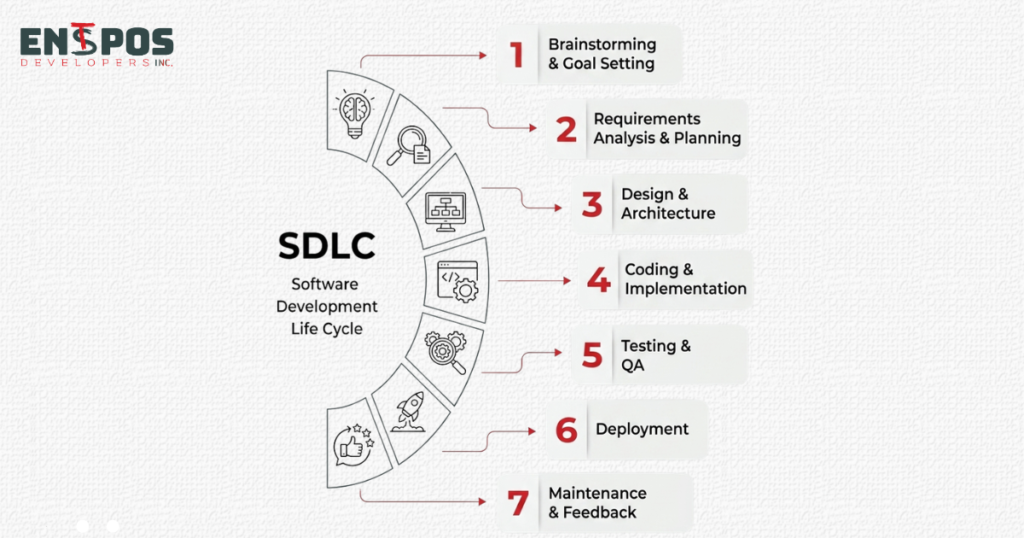
Nazima 6:01 am April 23, 2026 From Idea to Deployment: Complete Software Development Lifecycle Explained Simply Businesses often think that software is about writing code.. The hardest part is actually turning a vague idea into a reliable product that solves a real business problem. That is why a structured software development process is so important. It gives teams a path from concept to launch and helps reduce confusion and expensive mistakes. Software projects rarely fail because of one issue. Often they struggle because the process was unclear from the start. A business may want an app or a customer portal. Without a structured approach the team can easily build the wrong thing or launch too late. A organized development lifecycle helps everyone stay aligned and focused on outcomes not just features. Idea and Requirement Gathering Every successful project starts with a problem.. Many businesses begin with an idea that sounds good but is still too broad to build effectively. For example saying “we need a customer app” is not enough. A better question is: what should the app help customers do that they cannot do easily today? Unclear ideas often lead to failed projects because the team spends time building features nobody truly needs. To avoid this it is essential to gather requirements. This means asking questions identifying users defining business goals and documenting must-have features before any work begins. The quality of the product is usually limited by the quality of the first conversation. If the requirements are vague the results will be vague too. Planning and Analysis Once the idea is clear the next step is planning. This is where the team decides what is realistic how long it may take and what it will cost. For business owners this phase is especially important because it turns ambition into a roadmap. Common mistakes happen when companies skip analysis and rush into development. A simple example is a business wanting a sales system connected to inventory, payments and reporting. On paper it sounds straightforward.. Each integration can add time, cost and complexity. Planning helps teams break the project into phases so the business can launch in a controlled way of waiting months for one massive release. Design Phase Design is not about making software look attractive. It is about making it easy to use, easy to understand and easy to trust. Good design focuses on how the software feels to a user and how it is structured behind the scenes. Poor design creates friction. Can lead to lower adoption and weaker results from the software investment. Imagine an ordering platform with a cluttered checkout process. Even if the product works technically customers may leave before completing a purchase simply because the experience feels frustrating. On the hand a clean and intuitive design can improve conversions reduce training time and increase satisfaction. Development Phase This is the stage most people think of first: coding.. Development is not just one long stretch of programming. It is a process where developers build features in parts, test ideas as they go and refine the product through regular feedback. Challenges are normal here. The best development teams communicate clearly ask questions and build with the real use case in mind. Testing and Quality Assurance Testing is what protects a business from mistakes after launch. It checks whether the software works as expected and whether users can complete tasks smoothly. Many companies underestimate this phase because they assume bugs are minor.. Even small issues can damage revenue, trust or internal productivity. For example a bug in an e-commerce checkout process could cause customers to abandon purchases. A reporting error in software could lead management to make decisions based on the wrong numbers. Testing should cover functionality, user experience, performance and security. The goal is not perfection. Confidence. Deployment Deployment is the moment software becomes available to users. It may be launched at once or released in stages depending on the product and business risk. While launch day is exciting it is also where preparation matters most. Even a built product can face issues if deployment is rushed or poorly coordinated. Common deployment problems include server overload, setup errors and confusion among users. That is why many teams prepare launch checklists rollback plans and support arrangements before release. Deployment is not a technical handoff; it is a business event. The smoother the launch the faster the software can start delivering value. Maintenance and Updates Many business owners think the project ends once the software goes live.. Launch is only the beginning. Software needs maintenance, updates and improvements to stay secure, useful and competitive. Over time businesses may need bug fixes, performance improvements and changes based on user feedback. Costs do not disappear after launch; they simply shift from build costs to support and improvement costs. A good example is a customer-facing platform that launches successfully but later needs optimization or new reporting features. Without maintenance the product slowly becomes outdated and less effective. With updates it stays aligned with business goals and user expectations. A structured software development lifecycle saves time cost and effort because it reduces guesswork at every stage. It helps businesses move from an idea to a product, with clearer expectations, better quality and fewer costly surprises. For -technical business owners the key lesson is simple: software success depends on process as much as it depends on code. Choosing the development approach is not just a technical decision; it is a business decision. The right process can turn an idea into a digital asset that supports efficiency, customer satisfaction and long-term growth. Recent Posts
Hidden Costs of Custom Software
Nazima 6:31 pm April 20, 2026 Hidden Costs of Custom Software Development No One Talks About Most business leaders see custom software as the ultimate investment — a tailor-made solution designed to fit operations perfectly, scale with growth, and reduce long-term costs. But beneath that promise lies a more complex reality that often goes unspoken. Custom software can absolutely become a powerful competitive advantage — but only when its true cost is understood. And that cost goes far beyond the initial development invoice. It includes the ripple effects that emerge after launch. From unpredictable maintenance expenses to hidden team dependencies, businesses frequently discover that their “custom advantage” demands far more than anticipated. Let’s explore the lesser-known costs that quietly shape every custom software journey. Unexpected Maintenance Costs Many organizations assume that software spending ends at delivery. In reality, development is only half the story. Once a product goes live, maintenance, updates, and performance optimization can consume 15–25% of the original development cost annually. The Hidden Issue Software is never static. Technologies evolve — frameworks become outdated, third-party APIs change, and operating systems update. Each shift can trigger code rewrites, UI adjustments, or extensive regression testing. What begins as a modern, efficient system can quickly turn into a resource-heavy maintenance cycle. Real-World Example A mid-sized logistics company invested in a custom tracking solution built on a once-popular but short-lived tech stack. Within two years, the framework lost support. Maintaining compatibility began costing nearly as much as the original build, ultimately forcing a full system refactor. Business Impact Unplanned maintenance costs gradually erode ROI and redirect resources away from innovation. Instead of building new capabilities, teams end up maintaining old ones — slowing growth and turning a “future-ready” system into a legacy burden. Expert Insight Forward-thinking companies treat maintenance as a strategic investment, not an afterthought. Planning lifecycle support early — through SLAs, version control strategies, and upgrade roadmaps — prevents significantly higher costs later. Scope Creep and Changing Requirements Every project starts with clear goals — until business realities evolve. Market shifts, stakeholder input, and emerging user needs often introduce scope creep — one of the most underestimated cost drivers in custom development. The Hidden Issue Custom software offers flexibility, but that flexibility can become a liability. Each “small change” adds complexity, extends testing cycles, and impacts dependencies. Real-World Example An e-commerce company initially requested a simple order management system. Midway through development, they added features like customer rewards, predictive analytics, and real-time personalization. While valuable, these additions weren’t part of the original scope. The project timeline expanded from eight months to fifteen, and costs doubled. Business Impact Scope creep leads to delayed launches, shifting priorities, and stakeholder fatigue. It also increases the likelihood of bugs, rework, and misalignment. Often, the biggest cost isn’t financial — it’s the missed opportunity of entering the market late. Expert Insight Strong governance matters more than a “perfect plan.” Successful teams implement structured change management and lock features at key milestones — balancing innovation with execution discipline. Integration Challenges with Existing Systems A powerful new platform means little if it cannot integrate with existing systems. Integration is the silent backbone of digital infrastructure — and one of the most underestimated challenges in custom development. The Hidden Issue Legacy systems, outdated databases, and third-party tools often lack modern APIs or standardization. Connecting them can be far more complex than anticipated. Real-World Example A healthcare firm developed a patient onboarding application intended to integrate with its insurance verification system. However, the legacy system relied on a proprietary protocol from the 1990s. Developers had to build custom connectors from scratch — adding $75,000 in unexpected costs and delaying deployment by six months. Business Impact Poor integration leads to data silos, duplicated work, and operational inefficiencies. Instead of simplifying workflows, organizations end up managing disconnected systems. This complexity also slows future innovation — every new system introduces another compatibility risk. Expert Insight Before development begins, businesses should conduct a full technology audit. Compatibility mapping, standards evaluation, and proof-of-concept integrations can prevent costly surprises later. Time Delays and Their Financial Impact In business, time directly translates to money. Every delay affects market positioning, customer engagement, and operational costs — yet delays remain one of the most common realities in custom software projects. The Hidden Issue Software development involves interconnected phases — design, development, testing, and feedback loops. A delay in one area can cascade across the entire timeline. In many cases, delays originate from unclear client feedback, slow approvals, or evolving requirements. Real-World Example A fintech startup planned its product launch around a major industry event. Due to underestimated QA cycles and newly introduced compliance requirements, the launch was delayed by two months. The result: lost visibility, delayed funding opportunities, and a competitor capturing early market attention. Business Impact Delays don’t just increase costs — they reshape business outcomes. Startups risk losing investor confidence, while enterprises may miss transformation targets and KPIs. Expert Insight Accurate forecasting is more valuable than optimistic planning. High-performing teams incorporate buffer time, agile checkpoints, and phased delivery models to manage uncertainty effectively. Dependency on Development Teams Custom software often creates long-term reliance on the people who build it. The Hidden Issue When knowledge is concentrated within a few developers — or an external vendor — businesses become vulnerable. What happens if a key developer leaves? Or if the vendor changes pricing, priorities, or shuts down entirely? Real-World Example A manufacturing company built a custom ERP system with a small development agency. Two years later, the agency dissolved. The company struggled to onboard new developers who could understand the system, leading to significant retraining and debugging costs that reached six figures. Business Impact Dependency limits flexibility and increases risk. Vendor lock-in, knowledge gaps, and transition delays can directly impact operations. In worst-case scenarios, critical systems become difficult — or impossible — to maintain. Expert Insight Knowledge transfer must be intentional. Documentation, source code ownership, and internal training should be non-negotiable components of any custom development
Understanding Digital Footprints: What You Leave Behind Online

Nazima 5:19 pm April 17, 2026 What is a Digital Footprint? Think of your online activity like walking on wet sand—every step you take leaves a mark. A digital footprint works the same way. It’s the trail of data you create while using the internet, whether you’re posting on social media, browsing websites, or signing up for apps. Every click, comment, and search contributes to this invisible record, shaping how you appear in the digital world. Types of Digital Footprints There are two main kinds of digital footprints: 1. Active Digital Footprint This includes the information you intentionally share online. For example: Posting on social media Writing comments or reviews Filling out online forms You are fully aware of this data because you choose to share it. 2. Passive Digital Footprint This is collected without you directly providing it. For example: Websites tracking your browsing behavior Cookies storing your preferences Apps collecting location data Most people don’t realize how much information is gathered this way. Why Digital Footprints Matter Your digital footprint can have real-life consequences: Career Opportunities: Employers often check online profiles before hiring. Your posts can influence their decision. Online Reputation: What you share shapes how others perceive you. Privacy Risks: Too much exposed information can lead to identity theft or misuse of personal data. Targeted Advertising: Companies use your data to show ads based on your interests and behavior. In short, your online actions today can impact your future in ways you might not expect. Practical Tips to Manage Your Digital Footprint Here are five simple steps to stay in control: 1. Think Before You Share Pause and consider how your post might be viewed later. 2. Review Privacy Settings Adjust settings on social media and apps to limit who can see your information. 3. Search Yourself Online Occasionally look up your name to see what others can find. 4. Use Strong Security Practices Create strong passwords and enable two-factor authentication. 5. Limit Unnecessary Permissions Be cautious when apps request access to your location, contacts, or files. Recent Posts